
 Security policy
(edit with the Customer Reassurance module)
 Delivery policy
(edit with the Customer Reassurance module)
 Return policy
(edit with the Customer Reassurance module)
| PCB size |
36.0mm X 14.0mm X 1.6mm |
|
Working voltage |
3.3 or 5V DC |
|
Operating voltage |
3.3 or 5V DC |
|
Compatible interfaces |
2.54 3-pin interface and 4-pin Grove interface(1) |
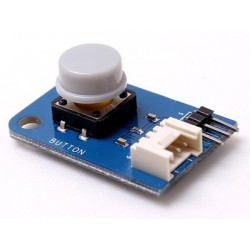
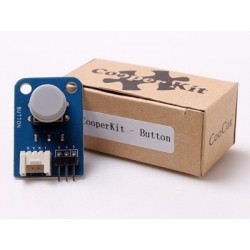
Note 1: S for digital output port, V and G for voltage at the common collector and ground respectively. Generally speaking, digital output is VCC; when the button is pressed down, the digital output is 0V.
#include "CooperKit_Button.h"
#include "CooperKit_RGBLed.h"

/*
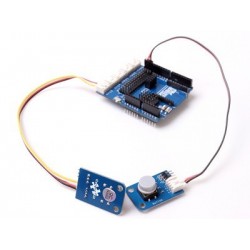
 * Connect the S port of CooperKit button switch to D0 Pin of Connect shield,
 * and we will use the following program to read the digital value. When the
 * digital value is high level, RGBLED R lamp(whicn is connected to sD1) will
 * be ON; when pressed down the digital value is low level, LED lamp will be
 * OFF.
 */
void Button_Led_Init(void);

void Button_Led(void)
{

        unsignedchar ucButtonRead;
        Button_Led_Init();

        while(1)
        {
                ucButtonRead = CooperKit_Button_Read();

                if(1== ucButtonRead )
                {
                        CooperKit_RedLed_On();
                        //Delay(10);
                }
                else
                {
                        CooperKit_RedLed_Off();
                        //Delay(10);
                }

        }

}

void Button_Led_Init(void)
{
        //
        // Before call this funciton, Configure the pin as PA1 (D0) which connect to CooperKit Button
        // signal first.
        //
        CooperKit_Button_Init();

        //
        // Before call this funciton, Configure the pin as PA0 (D1) which connect to CooperKit RGBLed
        // R signal first.
        //
        CooperKit_RGBLed_Init();
}
This demo is based on CoX M051 library, if you want to port to other CoX library, Just do the simple step below.
The Button driver is commucate with GPIO pin, so in the CooperKit_Button.h file, the port configuration group provides the gpio pin connection Macro to user for port. For example your Button signal pin is connect to GPIOA PIN1, you should modify the Macro as:
//*****************************************************************************
//
//! \addtogroup CooperKit_Button_Config
//! CooperKit Button configurator
//! @{
//
//*****************************************************************************
//
//! Configure the pin connection of CooperKit Button
//
#define CooperKit_Button_PIN  PA1
//
//! Set the effective output level of CooperKit Button when key is pressed down
//
#define CooperKit_Button_EFFECTIVE_LEVEL                   \
               0
//*****************************************************************************
//
//! @}
//
//*****************************************************************************
Your review appreciation cannot be sent
Report comment
Report sent
Your report cannot be sent
Write your review
Review sent
Your review cannot be sent
Reference: DWM14121905
Reference: DWM14121903
Reference: DWM14121904
Reference: DWM15110404
Reference: DWM14041801
Reference: DWM14071801
Reference: DWM14110202
Reference: DWM20101402
check_circle
check_circle